 WHOIS
WHOIS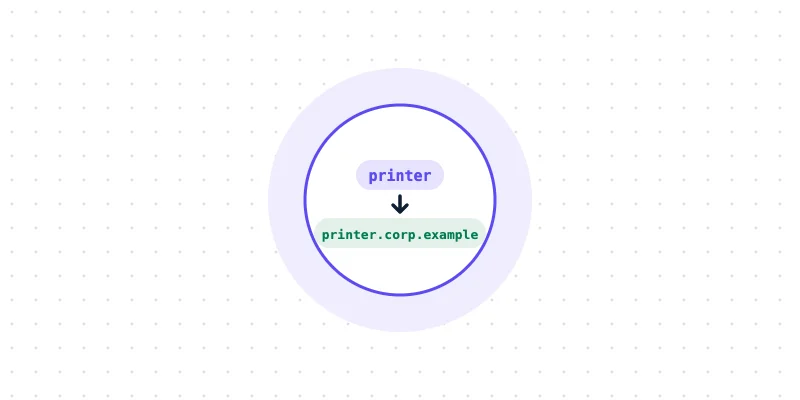
Quick answer: A search domain is a domain suffix that a device adds to short, incomplete names before looking them up in DNS. With the search domaincorp.example.com, typingprintermakes the device look upprinter.corp.example.com. It saves typing on internal networks, but it can also cause slow or surprising lookups.
Anyone who has typed a single word such as "intranet" into a browser at work and reached the right page has used a search domain without knowing it. So what is a search domain, exactly? It is a small DNS setting that quietly completes short names, and it explains many puzzling network behaviors.
This guide covers how search domains work, where they are set and how to troubleshoot them.
Key takeaways
- A search domain is a suffix added to short names before a DNS lookup.
- Devices can have a list of several search domains, tried in order.
- Search domains usually arrive automatically from the network through DHCP.
- A name ending in a dot is treated as complete, and no suffix is added.
- Poorly chosen search domains can cause slow lookups and leaked queries.
What is a search domain? The basic idea
DNS works with fully qualified domain names (FQDNs), such as printer.corp.example.com. People, however, prefer short names. A search domain bridges the gap.
When a device is asked to resolve a short name, it appends each search domain in turn and tries the result. If printer.corp.example.com exists, the lookup succeeds, and the user never sees the full name.
How a lookup with search domains works
The exact rules vary slightly between operating systems, but the common pattern is:
- The device checks whether the name ends with a dot. If it does, the name is treated as complete and looked up exactly as written.
- If the name has fewer dots than a set threshold, the device tries it with each search domain in order.
- If none of those succeed, the device tries the name on its own.
- If the name has enough dots, the device usually tries it as written first, then with the search domains.
On Linux, that threshold is the "ndots" option in /etc/resolv.conf, which defaults to 1. A name such as "printer" has no dots, so search domains are tried first.
Where search domains are configured
Through the network (DHCP)
Most devices receive search domains automatically when they join a network. DHCP option 15 sends a single domain name, and option 119 can send a full search list.
On Linux
The file /etc/resolv.conf contains a search line, such as search corp.example.com example.com. On many modern systems this file is managed by a service such as systemd-resolved or NetworkManager, so changes belong in that service's settings rather than in the file itself.
On Windows
The advanced TCP/IP settings let administrators add a list of DNS suffixes to append. Running ipconfig /all shows the active "DNS Suffix Search List".
On macOS
Network settings include a Search Domains box under the DNS options. The command scutil --dns lists the search domains currently in use.
Search domains and VPNs
Many VPN clients push their own search domains when they connect. That lets staff working from home reach internal servers by short names, just as they would in the office.
It also explains a common puzzle: a short name that works with the VPN connected stops working once it disconnects, because the search domain disappears with it. Some VPN setups go further and send only the company's own domains to internal DNS servers, a design often called split DNS.
A real-world example: containers
Search domains are central to many container platforms. In Kubernetes, for example, each pod gets search domains based on its namespace, so a service can be reached simply by its short name. Kubernetes also sets ndots to 5 by default, which means many external names are first tried with each search domain. That is a common cause of extra DNS traffic in busy clusters.
Common problems and how to fix them
Slow name lookups
Every search domain adds a possible lookup. With several entries and a high ndots value, one request can turn into many queries before the right answer appears. Writing full names in configuration files, or adding a trailing dot, such as api.example.com., avoids the extra work.
The wrong server is reached
If two search domains both contain a host with the same short name, the first match wins. Using full names for important services removes the ambiguity.
Internal names leak to public DNS
When a search domain is not a real, owned domain, lookups for internal names can travel to public DNS servers. That wastes time and can reveal internal naming. The safest choice is a subdomain of a domain the organization owns, such as corp.example.com. For home networks, the special-use name home.arpa was reserved for this purpose.
The ".local" ending is best avoided for search domains, because it is reserved for multicast DNS, the system many devices use to find each other on local networks.
Names that work on one device but not another
Two devices on different networks may have different search lists. Comparing the output of ipconfig /all or scutil --dns on each device usually reveals the difference within seconds, and adding the missing search domain or using the full name fixes it.
Checking how names resolve
To see what a full name actually returns, look it up directly with the DNS Lookup tool, using the complete name rather than the short one. Comparing the result with what a device returns locally often shows whether a search domain is involved. For the nameservers behind a domain, NS Lookup shows which servers answer for it.
Readers working with server logs may also find the guide on checking domains in a log useful, since search-domain lookups often appear there.
Summary
So, what is a search domain in practice? It is a convenience feature that completes short names, set by the network or by hand. Used well, it makes internal names easy to type. Used carelessly, it slows lookups and sends queries to the wrong place. A quick test with the DNS Lookup tool is the easiest way to confirm what a full name really resolves to.
Frequently asked questions
Is a search domain the same as a default domain?
They are closely related. A default or primary DNS suffix is usually the first entry in the search list, and some systems use the two terms almost interchangeably.
How can a search domain be turned off for one lookup?
Add a trailing dot to the name, such as "example.com.". The dot marks the name as complete, so no search domain is added.
Can a search domain affect website visits?
Rarely, but it can. If a short name in the address bar matches an internal host through a search domain, the browser may reach that host instead of searching the web.